Dispute Orders
What type of disputed orders can be submitted to order refund?
‒ Completed paid orders (free orders/gift orders cannot be disputed through the system).
‒ Note: Each order can only be disputed once.
Which circumstances can submit a disputed order?
‒ The Epal has not completed/fully completed the order.
‒ The Epal is suspected of fraudulent behavior.
What’s the timeframe for submitting disputed orders?
‒ After the Epal accepted the order, it will enter a countdown for submitting a refund request. The client has 72 hours to contact customer service and request a refund.
‒ If the client is unable to receive the service or get in touch with the Epal within 36 hours, it’s better to submit an order dispute through the system.
‒ Note: Once the Epal accepts the order, the system will automatically mark it as completed.
【Clients】How to submit a disputed order?
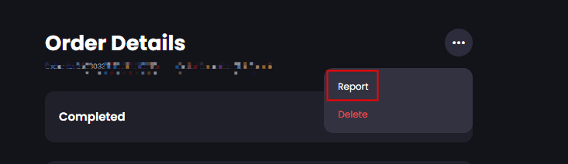
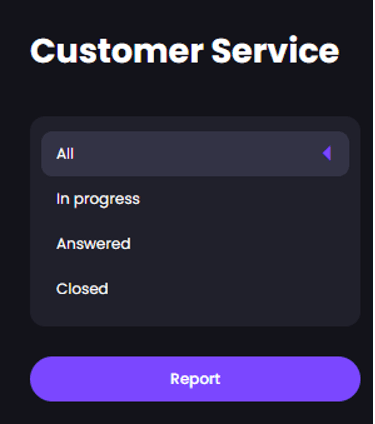
‒ Go to the homepage/order details page/Customer Service page.
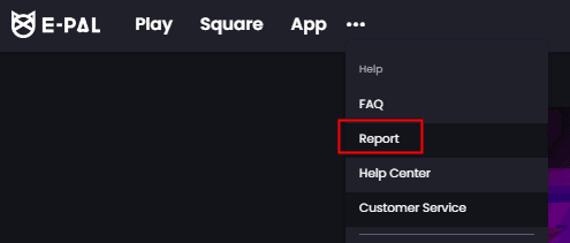
‒ Choose the "Report" option.
‒ Select the "Order Refund" theme.
‒ Choose the relevant "Order ID."
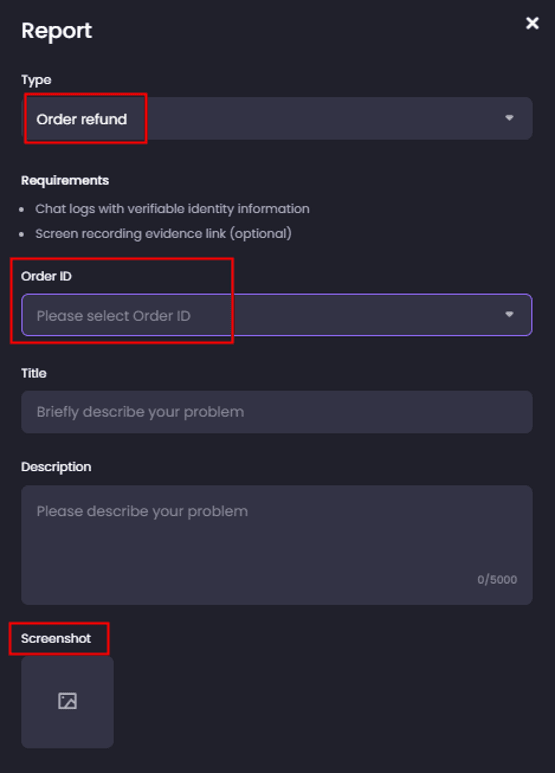
‒ Upload screenshots of the evidence.
‒ Note:
The order can not be operated in the system unless you select the appropriate "Order Refund" theme.
If you have multiple orders from the same Epal that need to be disputed, you can directly select multiple orders to submit in a case.
What’s the valid evidence for a disputed order?
‒ Evidence which can prove the order has (not) been fully finished includes screenshots, recordings, and other relevant information. Please note that we cannot access the third-party platform to verify identities. Before placing an order on the this website, please make sure to confirm all details with the other party, including the third-party contact information and in-game ID or names. This is helpful tocustomer service review the evidence.
‒ In order to protect yourself from harassment or fraudulent behavior during an order, please inform the other party that the game or conversation will be recorded for security purposes.
‒ Example of evidence:
● IM chat screenshots: (Need to display key information such as the Epal’s nickname.)
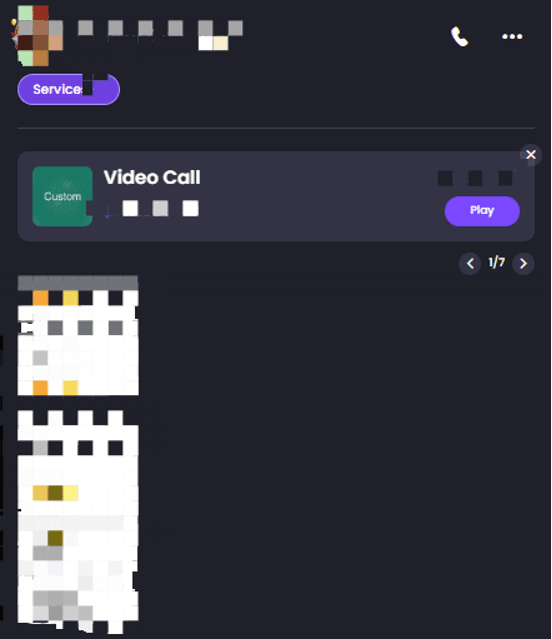
● Game performance screenshot evidence:
When submitting evidence involving game performance, please make sure to provide information about the game ID exchange, which could involve showing the game IDs of both parties to establish the connection between the evidence and the disputed order.

If the third-party platforms like Discord are involved in the evidence:
If the other party asks for your Discord ID, please make sure to confirm the identity again on the third-party platform and retain evidence of this confirmation.
If the other party provides the Discord ID, you should provide complete screenshots that include ID information.
When dealing with evidence from platforms like Discord, ensuring the authenticity of the conversation and verifying the identities of both parties is crucial. This can help establish the credibility of the evidence and support your case effectively in a dispute.
How long the disputed order processed?
‒ Resolving a disputed order typically takes a minimum of 3-7 business days. Customer service might also contact you for additional information to compare against the evidence provided by the other party. If it requires more time due to its complexity, please be patient and allow for the necessary processing time.
What are the refund types of disputed orders?
‒ Full refund:
● A full refund can be initiated either by the Epal within 72 hours or by customer service after reviewing the situation.
‒ Partial refund:
● In cases where only a portion of the order has been fulfilled, customer service will review the evidence and circumstances to determine an appropriate partial refund amount.
‒ Refund refused:
● If the Epal has successfully completed the order according to the specified requirements or provide valid evidence, customer service might decide that the situation does not merit a refund, and therefore the refund request will be denied.
‒ Note【Epal】:
● The provision of appeal evidence is related to whether the order is completed. If the clients’ harassment prevents order completion, promptly preserve evidence and report it to customer service. After evidence verification, a (partial) refund will be issued and appropriate penalties will be applied to the client.
How to check the progress of a disputed order?
‒ 【Clients】
● Go to the dashboard.
● Navigate to "Customer Service": https://www.epal.gg/help/report
● Look for the sections labeled "In Progress" or "Answered."
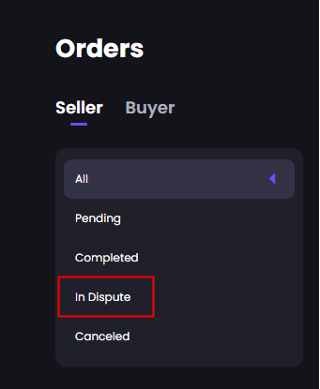
‒ 【Epals】
● Check the "Order" page to see if there are any orders "in dispute."
How to check the refund result for a disputed order?
‒ 【Clients】The client can check the "Wallet" section and look for "Buff Balance." If there are coupons involved: Go to the account and find the "Coupon" section. Please note all funds from disputed orders will be refunded to the ePal account.
‒ 【Epal】The buff of the disputed order will be automatically transferred to the wallet after it resolved (if the refund is denied). If there is used coupons, a full refund will also include the return of the coupons.
【Clients】How to cancel a disputed order?
‒ Access the dashboard.
‒ Navigate to "Customer Service" by going to https://www.epal.gg/help/report.
‒ Locate the relevant case and open it.
‒ Within that case, reply to the existing thread or create a new case to get in touch with customer service and request the cancellation of the disputed order.
‒ Keep in mind that if the refund is refused or canceled by customer service, the order won't be eligible for further dispute.
Order Reviews FAQ
‒ During the disputed order processing period, comments will not in public. Only the client and the Epal can view details.
‒ Free orders will not enter the dispute system.